
How to Export a STEP in Fusion 360
This is a quick guide on how to export a STEP file in Fusion 360 for laser cutting.
DesignFusion 360
On this page
Fusion360 is a great platform for designing laser cut and sheet metal parts manufactured via our laser cutting service. Exporting your parts from Fusion360 as A STEP file is fast and easy, only taking a few seconds. After your files are exported you can upload them to our instant quoting platform to receive instant pricing for your laser cut or sheet metal parts.
Exporting Parts
- Since Fabworks accepts both flat and bent parts in step form there is no need to make a flat pattern for your sheet metal parts. Just ensure your bend radius and K-Factor is set according to our Sheet Metal Bending Service Guidelines.
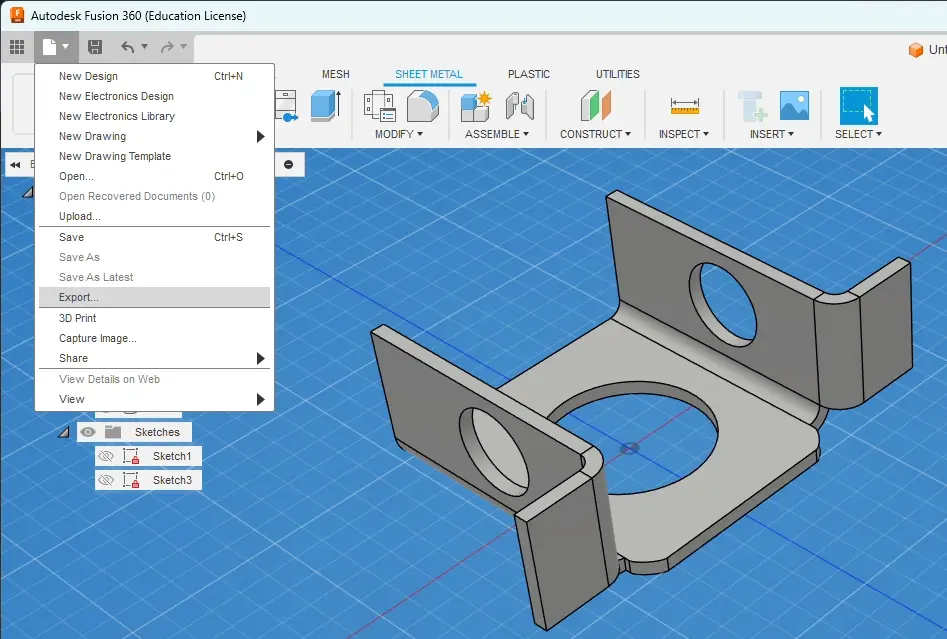
- Navigate to the File Icon in the top left, and click “Export…”
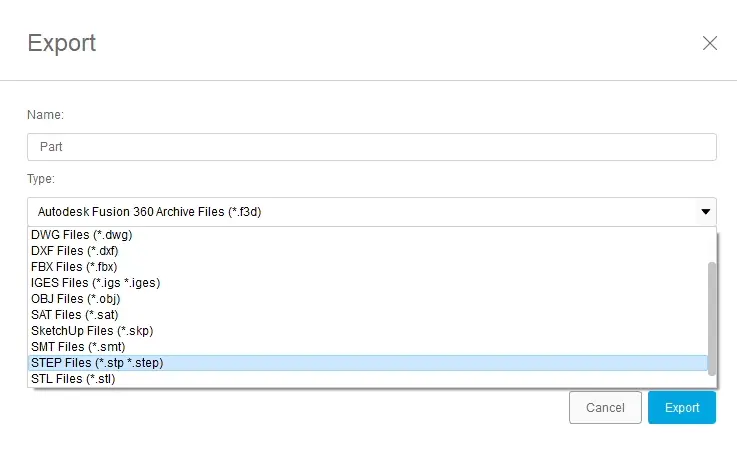
- Once the export dialogue shows up make sure “STEP Files” is selected in the “Type” drop-down. After confirming you are exporting a step file simply click on the “Export” button.
- Once your part has finished downloading, navigate to the Fabworks Laser Cutting Service, and simply drop your file into the upload section to get an instant quote on your part.
Related services
Order Sheet Metal Parts.
Upload your STEP file for an instant laser cutting quote. Quote in seconds, order in minutes, receive parts in days.